
Trick or Treat? The Unusual Hack to Help You Banish Your Doom Scroll Distractions for Good and Rediscover Your Creative Focus

Ever feel like your creative free time gets stolen by doom scrolling social media?
Honestly, same.
My personal doom scrolling habit came to a head a few weeks ago.
I would get home from work or the gym and (without fail) turn to my phone.
And why not? I enjoy the never-ending supply of funny cat memes and inspirational reels about personal growth. Who doesn’t?!
The algorithm knows me (for better or worse) and I kept on scrolling.
What’s one more video?
One more.
One more.
Before you know it, an hour passed. Sometimes two.
We don’t need to be productive all the time.
But there’s a difference between intentional rest and mindless scrolling.
Checking my phone is so easy.
Too easy.
It’s right there, all the time.
I can’t get rid of it.
But I did need to create some distance.
Then, ironically, the social media Gods sent me the answer to do just that.
This one clip changed everything for me.
Cillian Murphy’s Minimalist Phone Hack
One evening, a clip popped up on my feed.
It was Cillian Murphy (Oppenheimer, Peaky Blinders).
In an interview with Josh Horowitz, he noted a recent change to his phone— “totally minimalist black.” Wallpaper, apps, everything.
Huh.
My ears perked a little.
I didn’t realize that was a thing.
I was intrigued.
He turned off all the colors, the notifications, and the noise in one fell swoop.
Cillian may not have even realized it at the time, but he was using one of James Clear’s habit laws against distraction—”make it invisible.”
By reducing the colors, he was able to reduce the cue to trigger a behavior response.
It wasn’t eye-catching anymore. Not only that, he didn’t feel compelled to react to notifications because everything was the same.
I had to try it.
Paint it Black - My Attempt to Stop the Doom Scroll
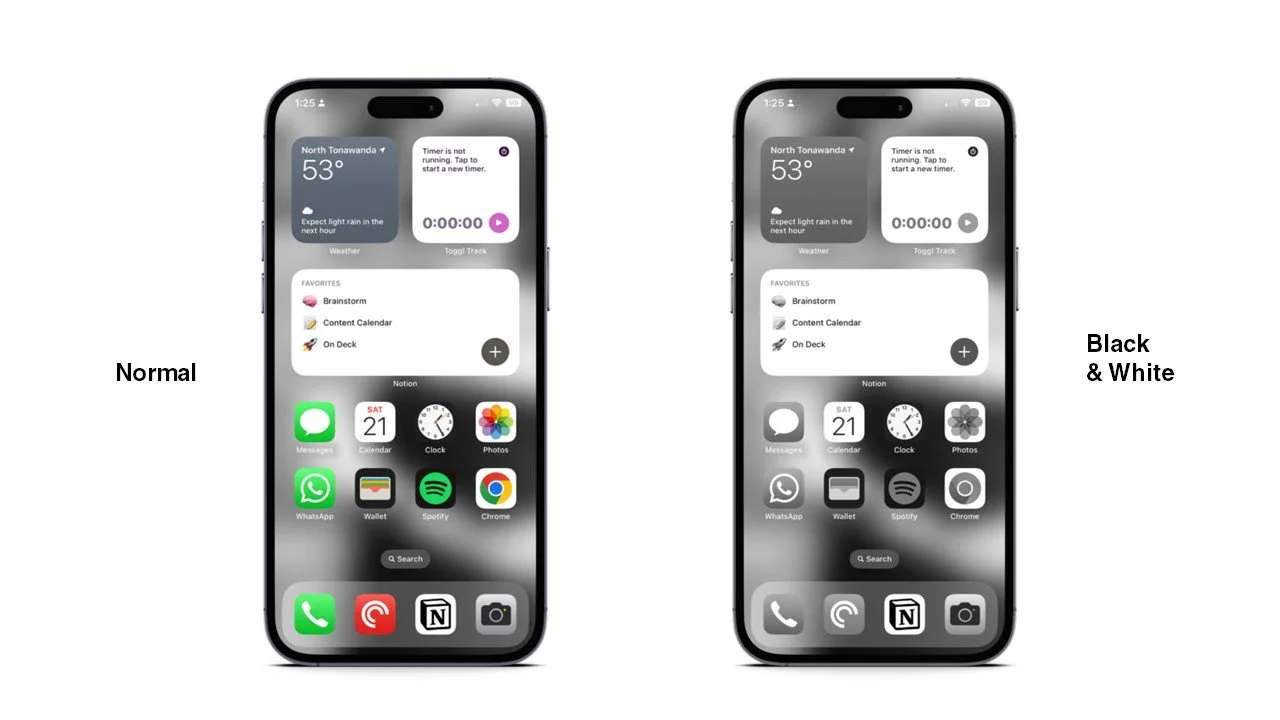
For the past week, my phone has been living its best life in black and white.
I can already tell a difference.
It’s less fun for sure. But it also feels like I’ve been sort of transported back to the 1950s when everything was still monotone.
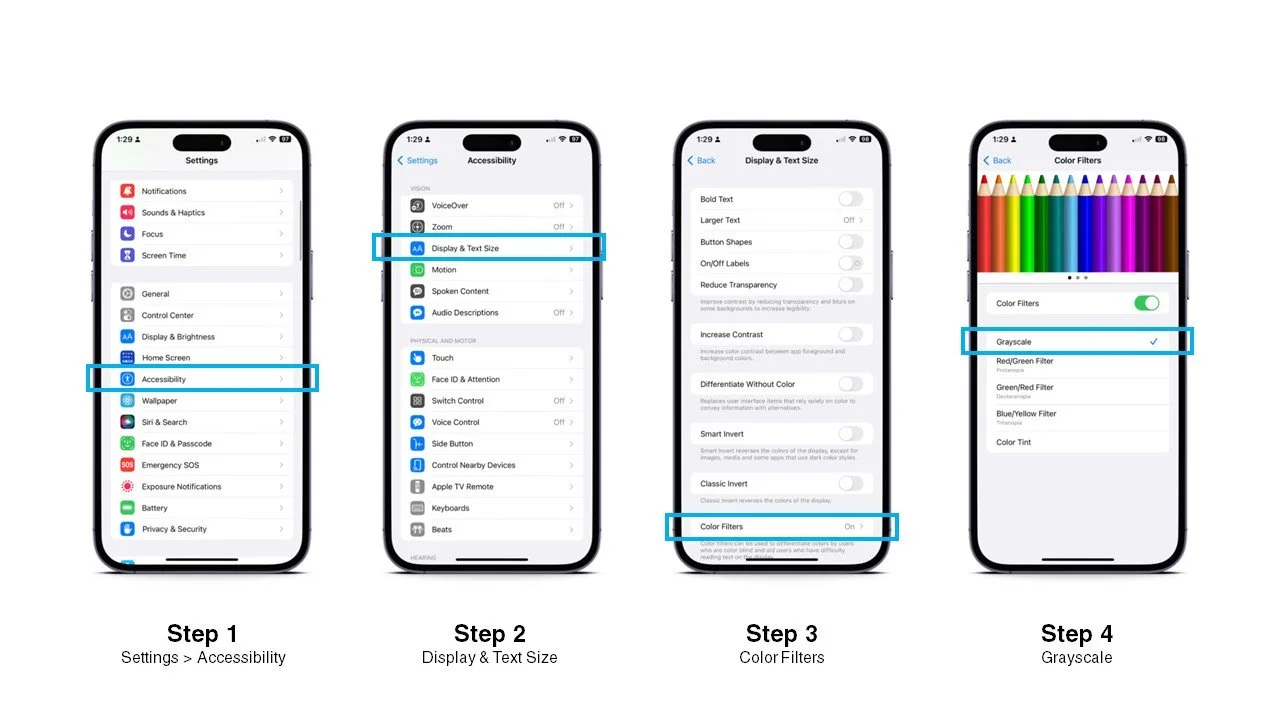
How to go Black and White on iPhone
(I’m sure there’s an equivalent procedure on Android, etc., but I don’t know what those are—sorry 😅. In that case, I’d say go get an iPhone and then follow these simple steps. 😉)
Settings app > Accessibility
Display & Text Size
Color Filters
Change to “Grayscale”
The other day, I turned color back on for a moment and couldn’t believe how intense the colors actually were. THIS is how I was living before?!
When we see these distractions over and over, it’s difficult to resist them.
They become a way of life.
But when we reduce the distractions—make them invisible—we start to lose interest.
We find different ways to connect with the world.
The trade off is that your phone basically looks like a paperwhite kindle. But I find the price is worth it for these benefits:
I noticed my productivity started to pick up on my creative projects.
I put down my phone for many hours without guilt.
I no longer felt brainwashed by notifications.
I checked my apps significantly less often.
My phone has at long last reverted back to being just a tool for communication. And I’m more than happy to keep it that way.
5 More Ways to Reduce the Distractions from Your Phone Right Now
The move to Black and White Mode has changed how I see and use my phone.
If you’re looking for even more ways to reduce the control it has over you, here are 5 staples of my process. Any one of them will help you rework your relationship with your phone too.
Silence
Focus Modes
No Notifications
Organize for Success
Out of Sight. Out of Mind.
Silence
Anyone who knows me knows that I have my phone permanently on silent. I do this for two reasons. One—it’s less disruptive to people around me. Two—it’s less annoying to me personally. I do connect my phone to my smartwatch to vibrate when I’m getting a call, but not texts. This lets me see there’s a call, but decide silently how to respond (or not).
Focus Modes
Focus Modes let me decide what parts of my life to turn on and off.
In my iPhone I have 5 key focus modes available: Personal, Work, The Craft, Sleep, and DND.
Each allows certain calls to come through and all others to go to voicemail.
Personal — I turn on after I leave work each day. Only family and friends can reach me then.
Work — I turn on when I arrive at the office. Consistent team members and my office can call me during those hours.
The Craft — I turn on when I’m writing or making things. This is like Personal, but more refined with only one or two people who can reach me.
Sleep — What I turn on before I, well you know, sleep. This is like Do Not Disturb, but it allows a select group of people to reach me still if there’s an emergency.
Do Not Disturb — Then good old DND. I turn this one on when I need absolute silence. It’s the equivalent to turning off my phone completely. I only use this during important meetings or when I’m running.
No Notifications
Every time I used to see a little badge pop up on my apps, it would distract me. It got to be too much. Now I turn off all badge, sound, and pop-up notifications. I allow some notifications to show up on my home screen while the phone is sleeping, but those are few and far between.
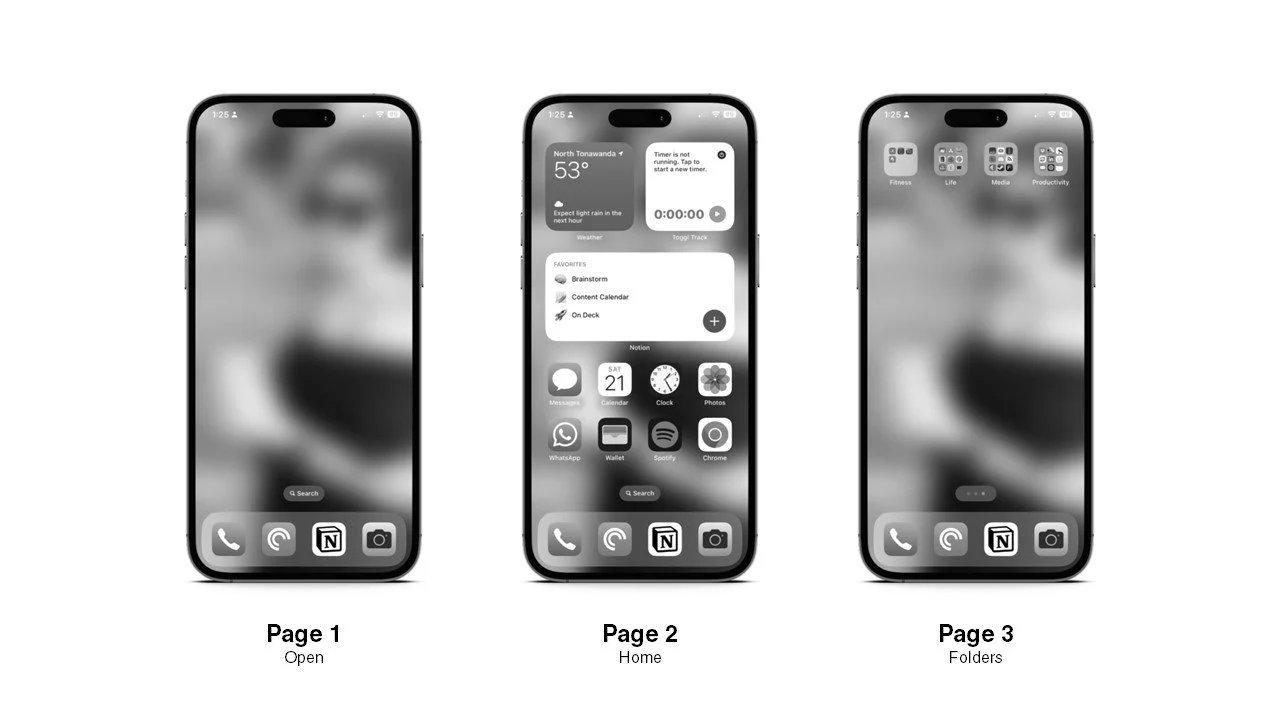
Organize for Success
One of the distractions I face is clutter on my phone.
I try to keep it organized by moving all of my primary functions to a second page.
The first page is actually left blank because when I open my phone, and I just see my wallpaper, it makes me less likely to check up on random apps.
The second page has things like my calendar, notion, and the weather.
The third page has a series of curated folders for life, productivity, and other tools. This is actually where the bulk of my apps live—hidden behind several layers of other gates.
Out of Sight. Out of Mind
Whenever I want to disconnect from my phone, I put it literally somewhere I won’t see it.
If I’m writing (as I am now), the phone lives in another room charging. I haven’t quite broken the habit of keeping my phone out of the bedroom, but it sits on a table on the other side of the room when I’m sleeping.
By not having it within reach or eyeline, it keeps being a phone.
I keep being a human.
Final Thoughts
Like any smart device, a phone is just a tool.
It can do amazing things. But for me, I find that the more I keep it as a way to track simple notes, do quick research, or communicate with immediate friends, family, and colleagues, the better off I am creatively.
I have more time and energy now to dedicate to the long term goals swimming around in my head.
I’m generally more engaged with the world around me because I’m less engaged with every little move my phone makes.
I don’t find myself doom scrolling against my will.
The world is so vibrant and full of imagination.
I want to live there and not on my phone.
If you feel the same, I know these hacks will help you treat your phone more like a tool and less like your actual life.
TL; DR
Your phone is a tool, not your life
Doom Scrolling takes time and control away from you
Turn your phone to black and white
5 other hacks to reduce phone distractions
Silent Mode
Focus Modes
No Notifications
Organize for Success
Out of Sight. Out of Mind.
Quote of the Week
Motivation for the days ahead of you.
“I'd get a lot more sleep if I didn't insist on reading the entire internet every night before bed.”
— Anonymous Doom Scroller
That's all for now.
Stay creative, my friends—and have a great week!